
Critical PHP Security Flaws Affecting WordPress and Other Websites
Security experts around the world are urging website owners to take action, with some organisations temporarily taking their websites offline as a precaution.
The good news? Security updates have already been released.
But if your business runs a website using WordPress, Drupal, Magento or another PHP-based system, it’s important to make sure those updates have been applied.
Here’s what’s happened, what the risks are and what you need to do.
What’s happened?
On 21 October 2026 (22 October in Australia), the developers behind PHP released urgent security updates to address two critical vulnerabilities.
PHP is a programming language that works behind the scenes on websites. It helps everything from contact forms and online stores to complex business systems function.
Think of it as part of your website’s engine. You don’t see it, but it’s doing a lot of the important work.
Security researchers discovered weaknesses that could, under certain conditions, allow hackers to access a website’s server without needing a password.
Because PHP is so widely used, the potential impact is significant. That’s why security agencies and website providers are treating this as a priority.
What are the security risks?
If someone successfully exploits these vulnerabilities, they could potentially:
- Access sensitive information, including customer or business data.
- Disrupt your website, affecting sales, enquiries or essential online services.
- Change or manipulate website content, potentially damaging customer trust.
- Access other connected systems, depending on your website’s security setup.
For businesses, the consequences could extend beyond a website outage, with potential financial, operational and reputational impacts.
Just because your website uses PHP doesn’t mean it’s been hacked.
It means you need to check whether your website is running an affected version and whether the necessary security updates have been applied.
Is your website affected?
Potentially, particularly if it uses a PHP-based platform such as WordPress, Drupal or Magento.
One thing that’s worth understanding is that updating your website’s content management system doesn’t necessarily update PHP.
For example, having the latest version of WordPress doesn’t automatically mean your website is protected against these vulnerabilities.
PHP is generally managed through your website’s hosting environment, so the required updates may need to be handled by your hosting provider, development agency or IT team.
If you’re unsure what technology your website uses, that’s completely normal. Your technical support team should be able to confirm.
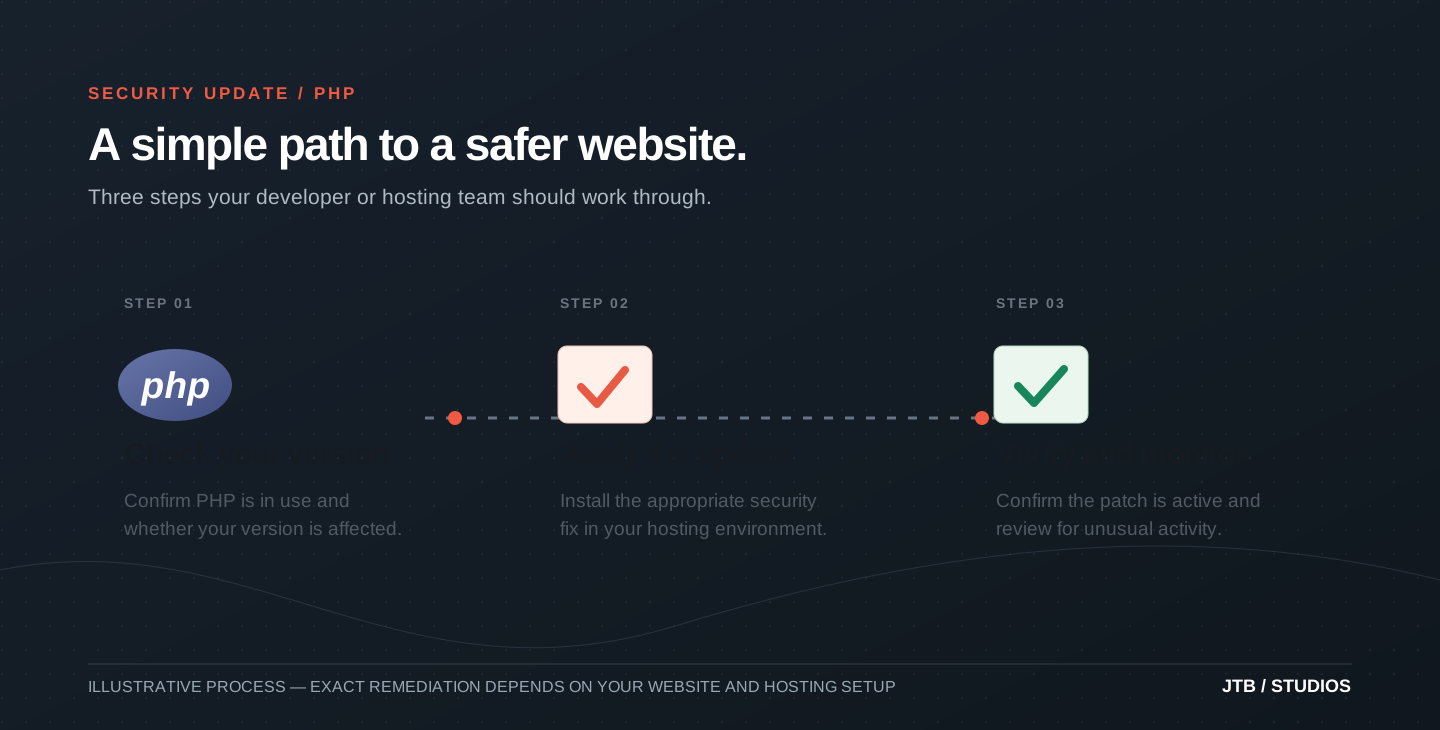
What should you do now?
You don’t need to become a website security expert overnight. But there are a few important things to check.
-
Confirm whether your website uses PHP.Ask your website provider, hosting company or development team whether your website relies on PHP and which version is running.
-
Check that the security updates have been applied.Security patches are available and should be applied as a priority. Older PHP versions may require additional work or an upgrade to a supported version.
-
Make sure someone is monitoring for suspicious activity.Your technical team should check for signs of unusual activity and ensure appropriate security monitoring and backups are in place.
-
Confirm who’s responsible for your website’s security.Whether it’s your internal IT team, hosting provider or digital agency, make sure there’s a clear plan for applying and verifying updates.
The biggest misconception is that if your website is still running, everything is fine. A vulnerability like this can go unnoticed behind a perfectly normal-looking website. The priority is to establish whether you’re affected, apply the necessary security updates and check for any signs of a breach.
Nate Davis, Technical Development Lead
Does your website need to be taken offline?
Not necessarily.
Some organisations have temporarily taken their websites offline while assessing the vulnerabilities and applying security updates.
For many websites, installing the appropriate PHP update is the key action.
However, if a vulnerable website can’t be secured promptly, temporarily restricting access or taking it offline may be the safest option.
Your website provider should be able to assess the situation and recommend the appropriate next step.
Who’s looking after your website between updates?
The urgent PHP update matters today. But what happens the next time a security issue comes along?
Many businesses have a plan for building their website, but not always for looking after it once it’s live. It’s easy to assume the developer, hosting company or internal IT team has everything covered, without being completely sure who’s responsible for what.
That’s where ongoing website support and maintenance makes a real difference. A good support package isn’t just someone to call when a page breaks. It should give you a clear approach to software and server updates, security checks, backups, monitoring and keeping the website running smoothly. It should also make clear what’s included, because not every maintenance package covers server-level security fixes.
It’s worth asking: is our website actively supported, or are we assuming somebody else is taking care of it?
Is your website ready for what’s next?
This is also a useful moment to think beyond the immediate security fix. Is your current website still the right fit for where your organisation is heading?
PHP isn’t the only technology available, but it isn’t automatically the wrong choice either. A well-maintained PHP website can be secure, reliable and capable of growing with your business.
Depending on what you need, alternatives such as managed website platforms or headless content management systems, which separate content editing from what visitors see, may offer different benefits. Some setups can reduce the amount of software you need to maintain or limit what is exposed to the public. Others give you more flexibility as your content, integrations and digital services grow.
No platform is risk-free or future-proof. The right choice depends on your business, your budget and the team supporting it.
One PHP security alert isn’t a reason to rebuild your website. But it is a good reason to ask whether your current setup is supported, secure and ready for the next few years.
Projects
